
Have you ever found yourself lost in the maze of streaming device options, wondering which one will truly transform your home entertainment setup? I’ve been there too. Just last month, I spent countless hours researching the perfect streaming companion for my new 4K TV, and wow, the options have evolved dramatically since I last looked!
In 2025, streaming devices aren’t just accessories anymore—they’re essential hubs that connect our digital lives to our living rooms. Whether you’re finally cutting the cord or upgrading your current setup, finding the right streaming device can mean the difference between a frustrating tech headache and a seamless entertainment experience.
I’ve tested dozens of the latest models, pitted them against each other, and narrowed down the absolute best options for every type of viewer and budget. From compact sticks that hide behind your TV to powerful boxes that double as gaming consoles, this guide will help you navigate the streaming landscape with confidence.
Table of Contents
What to Look for in a Streaming Device in 2025
Before diving into our top picks, let’s quickly cover what matters most when choosing a streaming device:
- Resolution capabilities: 4K, HDR, Dolby Vision support
- Processor speed: Affects app loading times and navigation smoothness
- Audio quality: Dolby Atmos and other enhanced audio formats
- Platform compatibility: Which streaming services are supported
- Special features: Gaming capabilities, voice control, smart home integration
- Form factor: Stick vs. box design, portability considerations
- Price point: Budget-friendly to premium options
Let’s jump into the best streaming devices that will elevate your viewing experience in 2025!
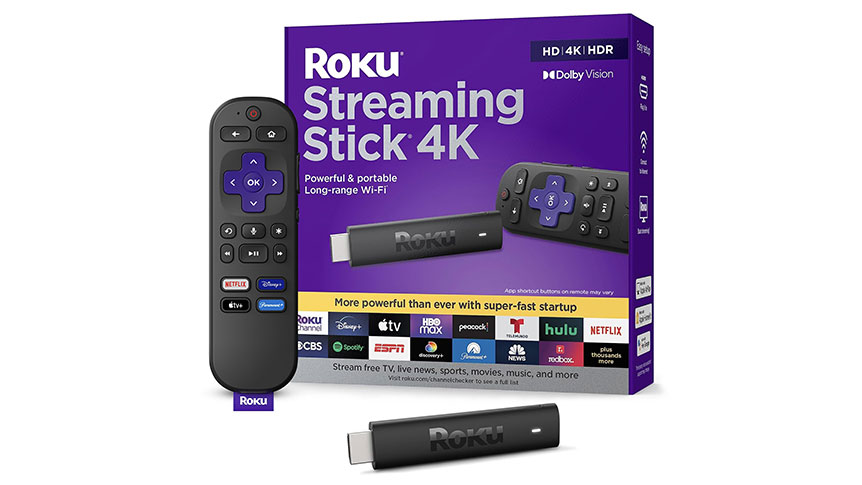
1. Roku Streaming Stick 4K: Best Overall Streaming Device
Price: ~$49.99
Remember when streaming devices were clunky boxes with confusing interfaces? The Roku Streaming Stick 4K feels like it’s from a different universe entirely. This sleek stick hides discreetly behind your TV while delivering an impressive suite of features that make it my top pick for most viewers.
I recently set one up at my parents’ house, and even my tech-averse dad was navigating through Netflix and Disney+ within minutes. That’s the magic of Roku’s intuitive interface—it simply works.
Key Features:
- Portable stick design that plugs directly into your HDMI port
- Super-fast startup that gets you to your content without the wait
- Long-range Wi-Fi performance for reliable streaming in any room
- 4K resolution with Dolby Vision and HDR10+ support for vibrant colors
- Voice remote with TV controls and voice search capabilities
- Massive content library including 350+ free live TV channels
- Works with Siri, Alexa, and Google Assistant for hands-free control
What I love most about the Roku Streaming Stick 4K is its platform-agnostic approach. Unlike streaming devices from Amazon or Google, Roku doesn’t prioritize any particular streaming service, giving you an unbiased, streamlined experience focused on finding the content you want.
The redesigned long-range Wi-Fi receiver delivers up to twice the speed of previous models, which means less buffering—even when you’re streaming 4K content from another room. And at under $50, it offers exceptional value without sacrificing performance.
Perfect for: Anyone looking for a simple, powerful streaming solution that works with virtually any modern TV and offers access to nearly everything worth watching.
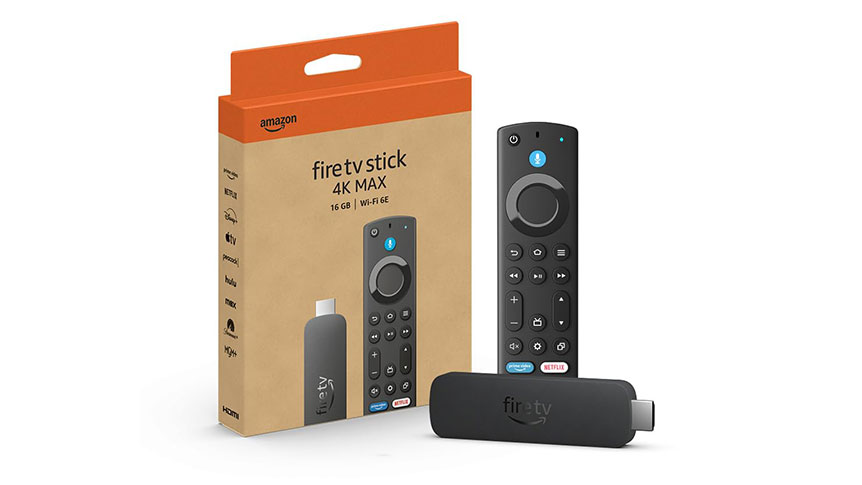
2. Amazon Fire TV Stick 4K Max: Best for Alexa Users
Price: ~$59.99
If your home already contains Echo devices or you rely heavily on Alexa, the Fire TV Stick 4K Max is your perfect streaming device. The newest model supports Wi-Fi 6E for lightning-fast connections and comes with 16GB of storage—double that of the standard Fire TV Stick 4K.
I’ve always appreciated Amazon’s approach to making technology feel personal, and this streaming device is no exception. Last week, I was watching a thriller and simply said, “Alexa, show me action movies with car chases,” and within seconds, I had a curated list of options. It’s these small moments of seamless technology that make the Fire TV Stick 4K Max stand out.
Key Features:
- Powerful processor for quick app launches and smooth navigation
- Xbox cloud gaming access without requiring a console
- AI-powered search that understands natural language queries
- 4K Ultra HD with Dolby Vision, HDR10+, and Dolby Atmos audio
- Fire TV Ambient Experience displaying art and photography when not in use
- 16GB storage for apps, games, and downloads
- Enhanced voice remote with dedicated channel buttons
One of the most unexpected delights of the Fire TV Stick 4K Max is its gaming capability. Through Xbox Game Pass Ultimate, you can stream games like Forza Motorsport and Starfield directly to your TV—no console required. For casual gamers who don’t want to invest in dedicated hardware, this feature alone might be worth the price of admission.
The interface does prioritize Amazon content, which some users find distracting. However, the powerful search functionality makes it easy to find what you’re looking for, regardless of which platform it’s on.
Perfect for: Amazon Prime members, Alexa users, and those who enjoy casual gaming alongside their streaming entertainment.
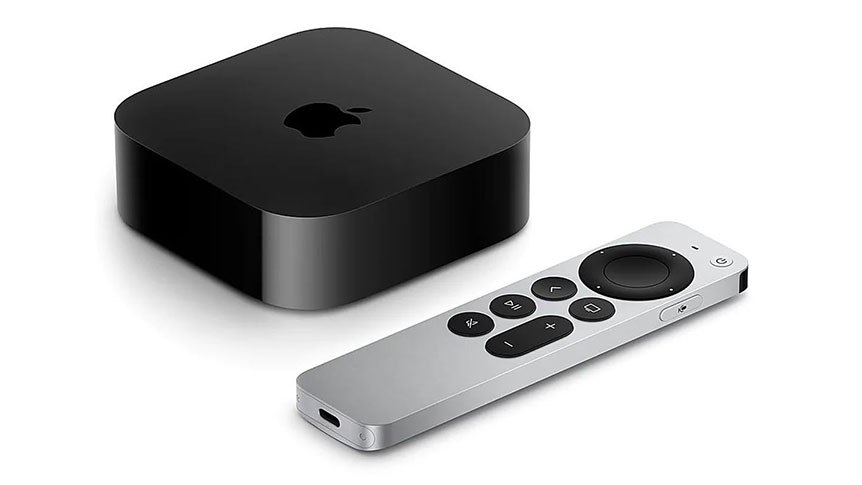
3. Apple TV 4K (3rd Generation): Best Premium Streaming Experience
Price: ~$129.99 (64GB), ~$149.99 (128GB)
The Apple TV 4K isn’t just a streaming device—it’s a statement piece that demonstrates Apple’s commitment to creating premium experiences. Yes, it comes with a premium price tag, but after using it for several months, I can say it delivers value that justifies the cost for certain users.
Powered by the A15 Bionic chip (the same processor found in recent iPhones), this streaming device flies through menus and apps with zero lag. The picture quality is simply stunning, with support for 4K, Dolby Vision, HDR10+, and Dolby Atmos creating a truly cinematic experience in your living room.
Key Features:
- A15 Bionic chip for unmatched performance
- Available in 64GB (Wi-Fi) or 128GB (Wi-Fi + Ethernet) configurations
- Exceptional picture quality with 4K, Dolby Vision, and HDR10+
- Integration with Apple ecosystem (Apple TV+, Music, Arcade, Fitness+)
- Siri Remote with touch-enabled clickpad and USB-C charging
- HomeKit hub capabilities for smart home control
- Thread mesh network support for future-proof connectivity
What sets the Apple TV 4K apart is its seamless integration with other Apple devices and services. If you’re already invested in the Apple ecosystem, the ability to AirPlay content from your iPhone or iPad, access your Apple Music library, or continue your Apple Arcade games on the big screen adds significant value.
The Siri Remote, once a point of contention among users, has been refined into a genuinely useful tool that combines touch controls with physical buttons in an intuitive way. The addition of USB-C charging is a welcome update that aligns with Apple’s broader move toward this standard.
Perfect for: Apple enthusiasts, cinephiles who demand the highest quality picture and sound, and those who value a premium, ad-free interface.
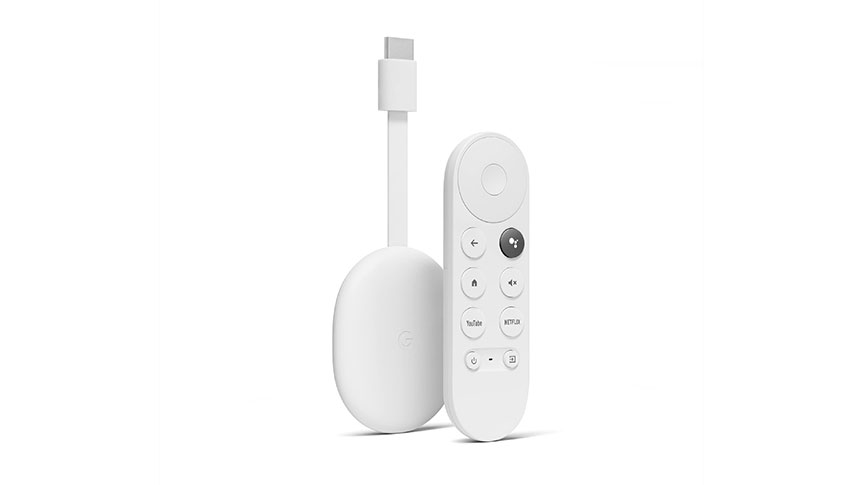
4. Google Chromecast with Google TV (4K): Best for Google Services Integration
Price: ~$49.99
Google’s Chromecast has come a long way from its early days as a simple casting device. The Chromecast with Google TV transforms the experience with a full-featured interface and dedicated remote, while maintaining the casting functionality that made the original so popular.
I’ve found myself increasingly drawn to this streaming device over the past few months, particularly because of its impressive content aggregation. Rather than making me hop between apps to find something to watch, Google TV presents personalized recommendations across all my subscriptions in one unified interface.
Key Features:
- Google TV interface with personalized recommendations
- 4K HDR streaming with vibrant colors
- Voice remote with Google Assistant integration
- Seamless casting from Android and iOS devices
- Kids profiles with parental controls
- Designed with recycled materials for environmental consciousness
- Affordable price point at under $50
The Google Assistant integration shines in daily use. Beyond simple content searches, I can ask about the weather, control smart home devices, or even view my Nest doorbell camera feed without interrupting my viewing. This level of smart home integration feels genuinely useful rather than gimmicky.
I particularly appreciate the kids’ profile feature, which creates a safe viewing environment with appropriate content recommendations and customizable themes. The ability to set watching time limits and bedtimes provides valuable peace of mind for parents.
Perfect for: Android users, smart home enthusiasts who use Google Nest products, and viewers who appreciate content discovery across multiple streaming services.
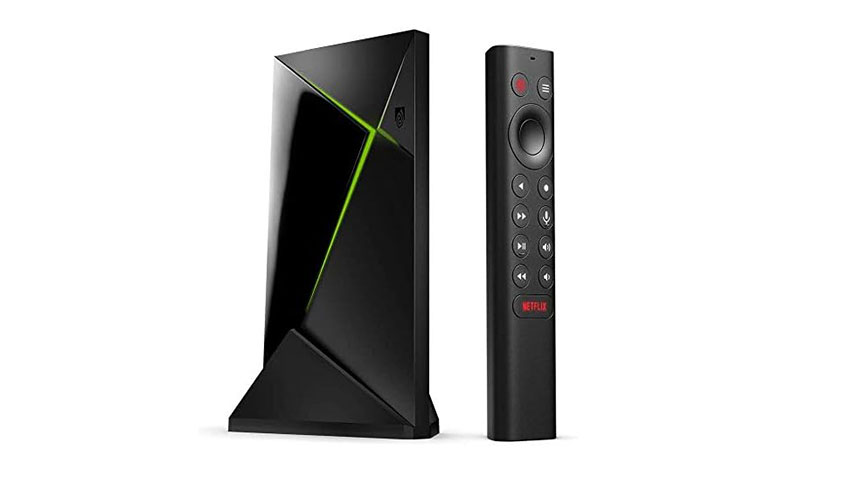
5. NVIDIA SHIELD Android TV Pro: Best for Gamers and Power Users
Price: ~$199.99
The NVIDIA SHIELD TV Pro is the undisputed heavyweight champion of streaming devices. While it commands a premium price, it delivers performance and capabilities that justify the investment for the right user.
As someone who enjoys both high-quality media and gaming, I’ve found the SHIELD to be in a class of its own. The AI-enhanced upscaling is particularly impressive—it can take 720p or 1080p content and intelligently enhance it to near-4K quality in real-time, breathing new life into older content.
Key Features:
- Tegra X1+ processor for unmatched performance
- AI-enhanced upscaling to 4K for improved picture quality
- GeForce NOW cloud gaming with RTX 3080 server access
- Dolby Vision and Dolby Atmos support
- Built-in Plex Media Server capabilities
- 3GB RAM and 16GB storage with expandability via USB 3.0 ports
- Google Assistant and Alexa compatibility
The SHIELD’s gaming capabilities set it apart from every other streaming device on this list. With GeForce NOW, you can stream PC games directly to your TV with stunning graphics and responsive controls. The RTX 3080 membership unlocks 4K HDR gaming with ray tracing and DLSS—features typically reserved for high-end gaming PCs.
For media enthusiasts, the built-in Plex Media Server functionality allows the SHIELD to serve as the central hub for your personal media library, streaming content to other devices in your home without requiring a separate server.
Perfect for: Serious gamers, home theater enthusiasts, and power users who want the most capable Android TV device available.
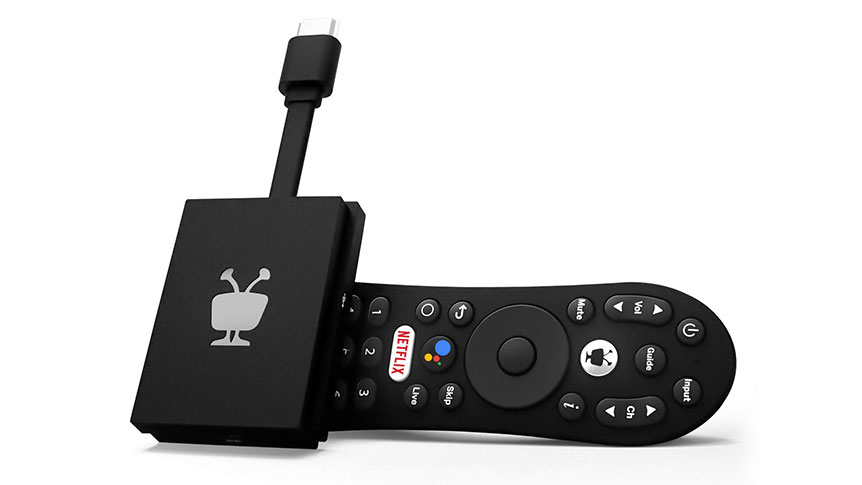
6. TiVo Stream 4K: Best for Live TV Integration
Price: ~$39.99
TiVo made its name with DVRs, and that expertise in content organization shines through in the TiVo Stream 4K. This affordable streaming device takes a unique approach by combining streaming apps with live TV in a unified interface, helping to bridge the gap for viewers transitioning from traditional cable.
I was skeptical about how well this integration would work, but TiVo has created something special here. The ability to browse content across multiple services without constantly switching apps makes discovering new shows remarkably painless.
Key Features:
- Unified content interface across streaming apps and live TV
- TiVo recommendation engine based on viewing habits
- Google Assistant voice control
- 4K UHD, Dolby Vision HDR and Dolby Atmos support
- Android TV platform with access to thousands of apps
- Compact dongle design that hides behind your TV
- Budget-friendly price point under $40
The TiVo Stream 4K runs on Android TV, so you’ll have access to thousands of apps through the Google Play Store. However, TiVo’s custom interface layer is what makes this device special. It aggregates content from Netflix, Prime Video, Disney+, Peacock, and more alongside live TV from services like Sling TV.
The recommendation engine deserves special mention—it learns from your viewing habits across all services and suggests content you might enjoy, regardless of which platform it’s on. This platform-agnostic approach feels refreshingly user-focused in an increasingly fragmented streaming landscape.
Perfect for: Cable TV enthusiasts looking to cut the cord without losing the familiar channel-surfing experience, and viewers who want content recommendations across multiple services.
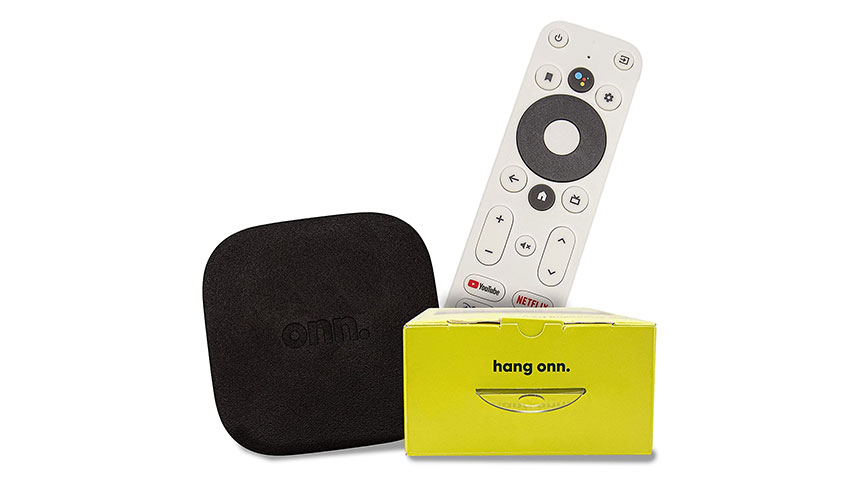
7. ONN Android TV 4K UHD Streaming Device: Best Budget Option
Price: ~$19.99
Sometimes the most surprising products come from unexpected places. The ONN Android TV 4K streaming device, Walmart’s in-house brand, delivers remarkable value at a price point that seems almost too good to be true.
I initially approached this device with skepticism—how good could a $20 streaming stick really be? The answer: surprisingly good. While it doesn’t match the premium feel or advanced features of devices costing five times as much, it handles the basics with competence.
Key Features:
- 4K Ultra HD resolution support
- Android TV operating system with Google Play Store access
- Voice remote with Google Assistant
- Chromecast built-in for casting from mobile devices
- Simple setup process with Google account integration
- High-quality audio with enhanced dialogue
- Includes HDMI cable for easy connection
The ONN device runs a clean version of Android TV without excessive bloatware, providing access to virtually all major streaming platforms. The included voice remote works well for basic searches and commands, though it lacks some of the advanced features found in more expensive alternatives.
Performance is adequate for general streaming needs, though you may notice longer app load times and occasional interface lag compared to more powerful devices. For casual viewers or those setting up streaming on secondary TVs, these minor compromises are easily overlooked given the exceptional value.
Perfect for: Budget-conscious shoppers, first-time streaming device buyers, and those setting up streaming on multiple TVs throughout the home.
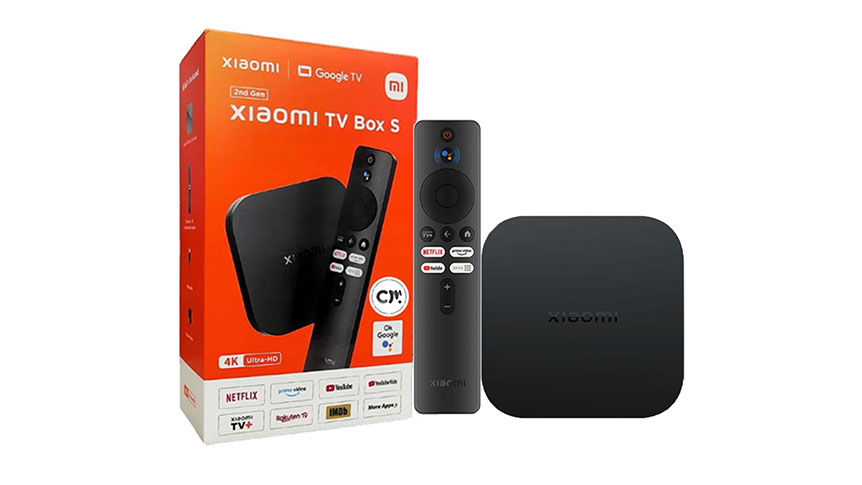
8. Xiaomi TV Box S (2nd Gen): Best International Content Access
Price: ~$69.99
The Xiaomi TV Box S (2nd Gen) doesn’t get as much attention as offerings from bigger brands, but it deserves consideration, especially for viewers interested in international content. Built on Google TV, this streaming device offers a robust feature set at a competitive price point.
What makes the Xiaomi stand out is its strong support for a wide range of audio and video codecs, making it exceptionally versatile for playing content from diverse sources. This capability, combined with Google TV’s content aggregation, creates a compelling package for viewers with eclectic tastes.
Key Features:
- Google TV interface with personalized recommendations
- 4K Ultra HD resolution with Dolby Vision and HDR10+
- Dolby Audio and DTS-HD sound support
- 2GB RAM and 8GB storage for smooth performance
- Dual-band Wi-Fi (2.4G/5G) connectivity
- Bluetooth 5.2 for connecting headphones and game controllers
- Compact, discreet design that fits anywhere
The Xiaomi TV Box S offers excellent performance for its price bracket, with sufficient RAM and processing power to handle 4K content without stuttering. The interface is responsive, and app load times are reasonable, if not quite as snappy as premium alternatives.
One notable strength is its comprehensive codec support, which ensures compatibility with content from virtually any source. This makes it particularly valuable for international viewers or those who maintain personal media libraries with diverse file formats.
Perfect for: International viewers, media enthusiasts who consume content from various sources, and those seeking a good balance of features and affordability.
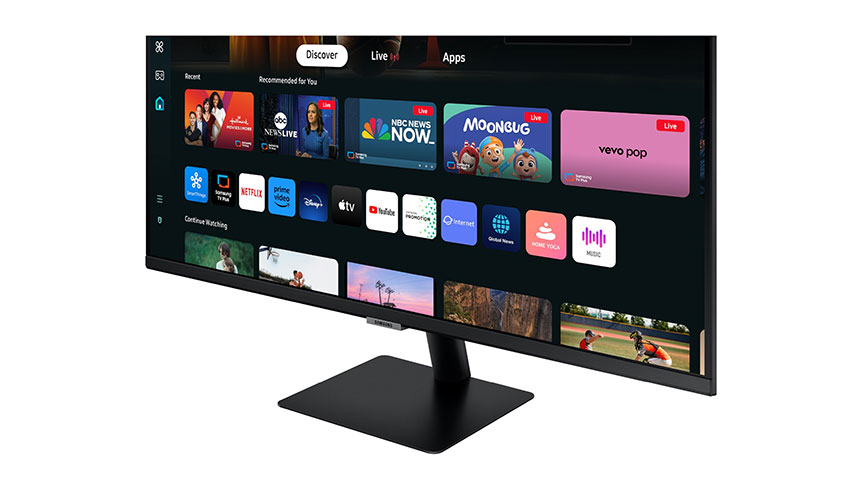
9. Samsung 32-Inch M7 Series Smart Monitor: Best All-in-One Solution
Price: ~$399.99
While not strictly a standalone streaming device, the Samsung M7 Smart Monitor deserves inclusion on this list for its innovative approach to combining a monitor and streaming platform. For apartment dwellers, college students, or anyone with limited space, this 2-in-1 solution eliminates the need for separate devices.
I recently set one up in my home office, and the versatility has been game-changing. During work hours, it connects to my laptop as a 4K monitor; after hours, it transforms into a smart TV with no additional hardware required.
Key Features:
- Built-in streaming platform with no external device needed
- 4K UHD resolution for crisp image quality
- Samsung TV Plus with free channels and on-demand content
- Multi-device control with one mouse and keyboard
- Multiple connectivity options including USB-C, HDMI, and USB-A
- Samsung Gaming Hub for cloud gaming access
- SolarCell Remote that eliminates disposable batteries
- Accessibility features for users with vision impairments
The Samsung Smart Monitor runs Tizen, the same operating system found on Samsung TVs, providing access to all major streaming platforms. The included SolarCell Remote is particularly impressive—its solar charging panel eliminates the need for disposable batteries, a small but meaningful environmental benefit.
For productivity, the monitor includes embedded apps like Microsoft 365, allowing you to work directly on the monitor without a connected PC. The remote access feature also lets you connect to your work computer from home, adding another layer of versatility.
Perfect for: Home office workers, college students, studio apartment dwellers, and anyone seeking to consolidate their tech footprint without sacrificing functionality.
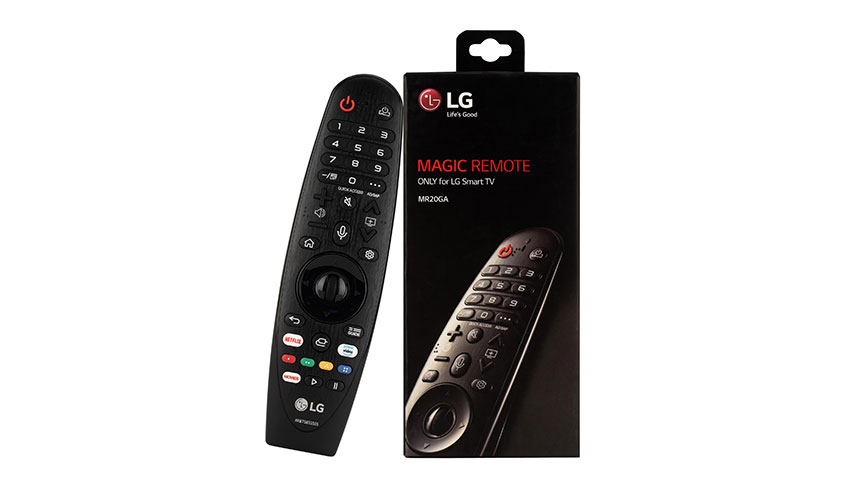
10. LG Magic Remote Control: Best Streaming TV Upgrade
Price: ~$49.99
Sometimes the best way to enhance your streaming experience isn’t by adding another streaming device, but by upgrading what you already have. For owners of LG smart TVs, the Magic Remote Control offers a significant upgrade over the standard remote included with many models.
This might seem like an unusual inclusion on a list of streaming devices, but after using one for several months, I’ve found it transforms the smart TV experience so dramatically that it deserves recognition.
Key Features:
- Intuitive pointer control that works like a computer mouse
- Scroll wheel for easy navigation through menus and content
- Voice recognition for searches and commands
- Compatible with 2018-2020 LG TV models (including OLED and NanoCell series)
- Netflix and Prime Video hotkeys
- Universal remote capabilities to control other devices
- Google Assistant and Alexa compatibility
The Magic Remote’s pointer functionality is its standout feature, allowing you to navigate menus and select content with natural pointing gestures rather than repeated button presses. This makes typing searches, browsing content libraries, and navigating complex apps significantly faster and more intuitive.
Voice recognition works surprisingly well for finding content, controlling playback, and even answering questions. The wheel control provides another natural navigation method, particularly useful for scrolling through long lists of shows or movies.
Perfect for: LG smart TV owners looking to enhance their existing streaming setup without adding another device to their entertainment center.
Read more on: Top 5 High-Speed Blenders for Perfect Smoothies.
Frequently Asked Questions About Streaming Devices
1. What are the best streaming devices for 4K HDR content?
For the ultimate 4K HDR experience, the Apple TV 4K and NVIDIA SHIELD TV Pro deliver exceptional performance with support for Dolby Vision and HDR10+. Both streaming devices offer powerful processors that ensure smooth playback of demanding content. If you’re on a budget, the Roku Streaming Stick 4K and Google Chromecast with Google TV provide excellent 4K HDR capabilities at more affordable price points.
2. Can I use a streaming device with an older TV?
Yes, most streaming devices will work with older TVs that have an HDMI port. If your TV doesn’t have HDMI (very rare these days), you can use an HDMI-to-RCA converter, though this will limit your resolution to standard definition.
For older 1080p HDTVs without 4K capabilities, all of the devices on our list will work perfectly—they’ll simply output at the highest resolution your TV supports. The Roku Express and basic Amazon Fire TV Stick are particularly cost-effective options for older TVs.
3. How do I set up a streaming device with my TV?
Setting up most modern streaming devices is straightforward:
👉🏿 Connect the device to your TV’s HDMI port
👉🏿 Plug the device into a power outlet
👉🏿 Switch your TV to the correct HDMI input
👉🏿 Follow the on-screen setup instructions
👉🏿 Connect to your Wi-Fi network
👉🏿 Sign in to your streaming accounts
Most devices guide you through this process with simple, step-by-step instructions. For optimal performance, use the HDMI ports labeled ARC or eARC if your TV has them.
4. Which streaming device supports Dolby Atmos and Dolby Vision?
Several streaming devices on our list support both Dolby Atmos and Dolby Vision, including:
• Apple TV 4K
• NVIDIA SHIELD TV Pro
• Amazon Fire TV Stick 4K Max
• Roku Streaming Stick 4K
Dolby Vision provides enhanced HDR with dynamic scene-by-scene optimization, while Dolby Atmos delivers immersive, object-based surround sound. To experience these technologies, you’ll need a compatible TV for Dolby Vision
5. What is the difference between a streaming stick and a streaming box?
Streaming sticks are compact devices that plug directly into your TV’s HDMI port. Their advantages include:
• Discreet, hidden installation
• Portability for travel
• Generally lower cost
• Simplified setup
Streaming boxes are larger devices that connect to your TV via an HDMI cable. Their advantages include:
• More powerful processors for better performance
• Additional ports (USB, Ethernet, etc.)
• Expanded storage options
• Better cooling for sustained performance
For most users, streaming sticks offer the best balance of convenience and performance. Power users who need additional connectivity or plan to use advanced features like gaming might prefer a streaming box.
6. Are there budget-friendly streaming devices available?
Absolutely! The streaming device market offers excellent options at various price points:
• Under $25: ONN Android TV 4K UHD Streaming Device
• Under $50: Roku Streaming Stick 4K, Google Chromecast with Google TV
• Under $75: Amazon Fire TV Stick 4K Max, Xiaomi TV Box S
These budget-friendly options provide access to the same streaming services as their more expensive counterparts, though you may sacrifice some premium features like enhanced gaming capabilities or advanced audio support.
7. Which streaming device works best for gaming and live TV?
The NVIDIA SHIELD TV Pro is the undisputed champion for gaming, offering access to GeForce NOW cloud gaming with support for hundreds of PC games. For casual gamers, the Amazon Fire TV Stick 4K Max provides access to Amazon Luna and simple Android games.
For live TV integration, the TiVo Stream 4K offers the most seamless experience, with its unified interface bringing together content from live TV services and traditional streaming apps. The Amazon Fire TV Stick 4K Max also performs well with live TV services through its content-forward interface.
8. Do all streaming devices support Netflix, Hulu, and Disney+?
Yes, all the devices on our list support major streaming services including Netflix, Hulu, and Disney+. However, the availability of smaller, niche streaming services may vary by platform. If you rely on specific apps, it’s worth confirming their availability before purchasing.
The most universally supported platforms include:
• Netflix
• Hulu
• Disney+
• Amazon Prime Video
• YouTube
• HBO Max
• Apple TV+
9. How do I control a streaming device using voice commands?
Most modern streaming devices include voice-enabled remotes or work with smart speakers:
1) Built-in voice remotes: Press and hold the microphone button while speaking your command
2) Smart speakers: Say the wake word followed by your command (e.g., “Hey Google, play Stranger Things on Netflix”)
3) Smart home integration: Link your streaming device to your smart home system for expanded voice control
The most robust voice control experiences come from the Amazon Fire TV Stick 4K Max (with Alexa), Apple TV 4K (with Siri), and Google Chromecast with Google TV (with Google Assistant).
10. What are the top brands for streaming devices in 2025?
The streaming device market continues to be dominated by established players with varying strengths:
• Roku: Known for user-friendly interfaces and platform neutrality
• Amazon: Offers deep integration with Alexa and Prime services
• Apple: Provides premium experiences with seamless ecosystem integration
• Google: Excels at content aggregation and Assistant integration
• NVIDIA: Delivers high-performance devices with gaming capabilities
Newer entrants like Xiaomi and ONN are gaining market share by offering competitive features at lower price points, while established brands like TiVo are leveraging their expertise in specific areas to create specialized streaming experiences.
Conclusion: Choosing the Right Streaming Device for Your Needs
The perfect streaming device ultimately depends on your specific needs, preferences, and existing technology ecosystem. Here’s a quick summary to help you decide:
- Best overall value: Roku Streaming Stick 4K
- Best for Amazon Prime members: Amazon Fire TV Stick 4K Max
- Best premium experience: Apple TV 4K
- Best for Google users: Chromecast with Google TV
- Best for gamers: NVIDIA SHIELD TV Pro
- Best for live TV integration: TiVo Stream 4K
- Best budget option: ONN Android TV 4K UHD Streaming Device
- Best for international content: Xiaomi TV Box S
- Best space-saving solution: Samsung 32-Inch M7 Series Smart Monitor
- Best TV upgrade: LG Magic Remote Control
Remember that the streaming landscape continues to evolve rapidly, with new services and features appearing regularly. The good news is that any of the devices on this list will provide access to a wealth of entertainment options that would have seemed unimaginable just a few years ago.
I’d love to hear about your experiences with these or other streaming devices. Which one works best in your home entertainment setup? Share your thoughts in the comments below!
Note: Prices are accurate as of April 2025 and may change. Always check the latest specifications and compatibility before purchasing.
Disclaimer: This article might contain affiliate links, meaning we may earn a commission if you click through and make a purchase at no extra cost to you.












2 thoughts on “Top 10 Streaming Devices for 2025: The Ultimate Guide for Cord-Cutters”